Why Best Practices Matter
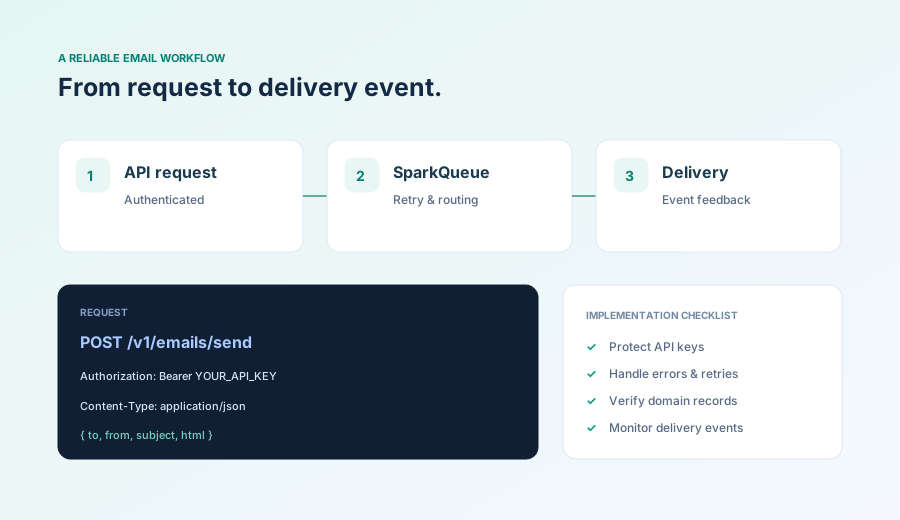
Following email API best practices ensures high deliverability, security, performance, and maintainability. This guide covers essential practices for developers and businesses implementing transactional email APIs.
Security Best Practices
Protect your API keys, user data, and email content with these security best practices.
- Never Commit API Keys: Store API keys in environment variables or secret management systems. Never commit them to version control.
- Use Environment Variables: Load API keys from environment variables in production. Use different keys for development, staging, and production.
- Rotate API Keys Regularly: Implement key rotation policies. Regenerate keys every 90 days or immediately if compromised.
- Implement IP Whitelisting: For enterprise accounts, restrict API access to specific IP addresses or ranges.
- Use HTTPS Only: Always use HTTPS for API requests. Never send API keys over unencrypted connections.
- Validate Webhook Signatures: Verify webhook signatures to ensure requests are authentic and haven't been tampered with.
- Sanitize User Input: Validate and sanitize all user input before including it in email content to prevent injection attacks.
- Limit API Key Permissions: Create API keys with minimal required permissions. Use read-only keys for monitoring and full-access keys only when needed.
# Good: Using environment variables
import os
API_KEY = os.environ.get('SPARKMAILR_API_KEY')

# Bad: Hardcoded API key
API_KEY = "sk_live_1234567890abcdef"
Performance Best Practices
Optimize your email sending for speed, efficiency, and scalability.
- Use Async/Await: Send emails asynchronously to avoid blocking your application. Use async libraries or background jobs.
- Implement Queues: Use message queues (RabbitMQ, Redis, SQS) to handle high-volume email sending without overwhelming your API.
- Batch Requests When Possible: Some APIs support batch sending. Send multiple emails in a single request to reduce overhead.
- Implement Retry Logic: Use exponential backoff for retries. Don't retry indefinitely - set maximum retry attempts.
- Cache Templates: Cache email templates in memory to avoid repeated API calls for template retrieval.
- Monitor Rate Limits: Track rate limit headers and adjust sending rate accordingly to avoid 429 errors.
- Use Connection Pooling: Reuse HTTP connections when making multiple API requests to reduce connection overhead.
- Implement Circuit Breakers: Stop sending emails if the API is consistently failing to prevent cascading failures.
💡 Performance Tip
For high-volume sending, implement a queue system that processes emails in batches. This allows you to control sending rate, handle failures gracefully, and scale horizontally.
Deliverability Best Practices
Ensure your emails reach recipients' inboxes with these deliverability best practices.
- Authenticate Your Domain: Set up SPF, DKIM, and DMARC records correctly. This is critical for inbox placement.
- Validate Email Addresses: Validate email addresses before sending to reduce bounce rates and improve sender reputation.
- Maintain Clean Lists: Remove bounced, invalid, and unsubscribed addresses from your sending lists regularly.
- Warm Up New Domains: Gradually increase sending volume for new domains to build sender reputation.
- Avoid Spam Triggers: Don't use spam trigger words, excessive capitalization, or suspicious links in email content.
- Include Unsubscribe Links: Always include clear unsubscribe links in marketing emails. Transactional emails should include preference management.
- Monitor Engagement: Track open rates, click rates, and spam complaints. Low engagement can hurt deliverability.
- Use Consistent From Addresses: Use consistent "From" names and addresses to build sender reputation.
- Handle Bounces Properly: Remove hard bounces immediately. Monitor soft bounces and remove addresses after multiple failures.
Code Quality Best Practices
Write maintainable, testable, and reliable email API integration code.
- Use Official SDKs: Prefer official SDKs over raw API calls. SDKs handle authentication, retries, and error handling automatically.
- Implement Error Handling: Handle all error cases gracefully. Log errors for debugging but don't expose sensitive information to users.
- Add Logging: Log email sending attempts, successes, and failures with appropriate log levels for monitoring and debugging.
- Write Unit Tests: Test your email sending logic with mocked API responses. Test error handling and retry logic.
- Use Type Hints: Add type hints to your code for better IDE support and fewer runtime errors.
- Document Your Code: Document email sending functions, especially custom logic or business rules.
- Separate Concerns: Create separate modules for email sending, template rendering, and email validation.
- Use Configuration Files: Store email templates, default values, and configuration in separate files, not hardcoded in your application.
# Good: Error handling with logging
import logging

logger = logging.getLogger(__name__)

def send_welcome_email(user_email):
    try:
        response = api.send_email({
            'to': user_email,
            'template': 'welcome',
            'variables': {'name': user.name}
        })
        logger.info(f"Welcome email sent to {user_email}")
        return response
    except APIError as e:
        logger.error(f"Failed to send welcome email: {e}")
        # Don't fail user registration if email fails
        return None
Content Best Practices
Create effective, engaging, and compliant email content.
- Write Clear Subject Lines: Use clear, descriptive subject lines. Avoid spam trigger words and excessive punctuation.
- Mobile-First Design: Design emails for mobile devices first. Most emails are opened on mobile.
- Use Plain Text Alternatives: Always include plain text versions of HTML emails for better compatibility.
- Optimize Images: Compress images and use alt text. Some email clients block images by default.
- Test Across Clients: Test emails in multiple email clients (Gmail, Outlook, Apple Mail) before sending.
- Keep It Concise: Transactional emails should be brief and focused. Get to the point quickly.
- Include Clear CTAs: Use clear call-to-action buttons with descriptive text.
- Personalize When Possible: Use recipient names and relevant data to personalize emails for better engagement.
Monitoring Best Practices
Monitor your email sending to catch issues early and optimize performance.
- Track Key Metrics: Monitor delivery rates, open rates, click rates, bounce rates, and spam complaints.
- Set Up Alerts: Configure alerts for high bounce rates, low delivery rates, or API errors.
- Monitor API Health: Track API response times, error rates, and rate limit usage.
- Log Webhook Events: Log all webhook events (delivered, opened, clicked, bounced) for analytics and debugging.
- Review Sender Reputation: Regularly check your sender reputation score and take action if it drops.
- Analyze Engagement Patterns: Identify optimal send times and content that performs best.
Compliance Best Practices
Ensure your email sending complies with regulations like GDPR, CAN-SPAM, and CCPA.
- Obtain Consent: Get explicit consent before sending marketing emails. Use double opt-in for better compliance.
- Include Unsubscribe Links: Always include clear, working unsubscribe links in marketing emails.
- Honor Unsubscribes Quickly: Process unsubscribe requests immediately (within 10 business days maximum).
- Protect User Data: Encrypt personal data in transit and at rest. Follow GDPR data protection requirements.
- Document Consent: Keep records of when and how users consented to receive emails.
- Respect User Preferences: Allow users to manage email preferences (frequency, content types).
- Include Physical Address: Include your physical business address in marketing emails (CAN-SPAM requirement).
Key Takeaways
Following these best practices will help you build secure, performant, and reliable email integrations. Start with security and deliverability basics, then optimize for performance and code quality. Regular monitoring and compliance checks ensure long-term success.